Dragon Tower Defense Trade Requests and Trading Plaza
Use the Trade menu to find players in your server and send requests for dragons, eggs and pass tickets.
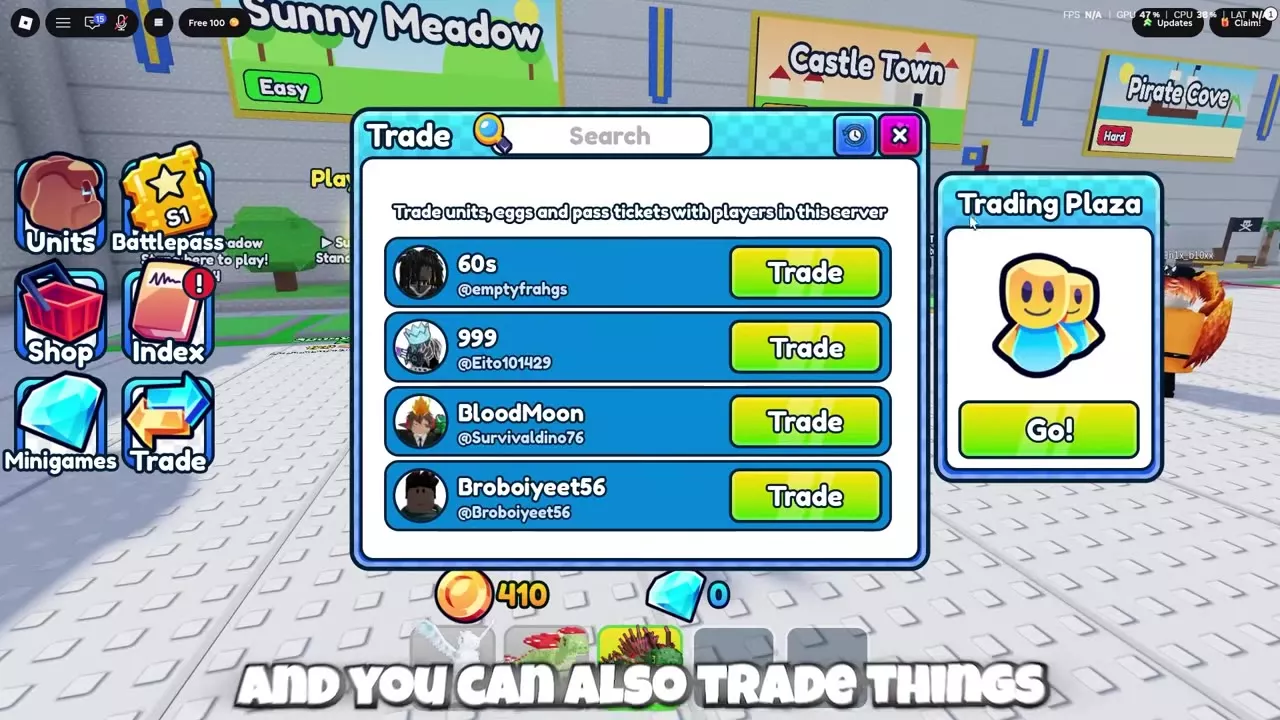
Win 3 matches to unlock trading, then open Trade on the left side of the lobby, find a player in your server and select Trade beside their name. Use Settings to control incoming requests, or select Go! on the Trading Plaza panel. Keep pass tickets unredeemed if you want to trade them.
Players and Tradable Categories
Win 3 matches to unlock trading. The Trade menu lists players in your current server and supports three item categories: units, eggs and pass tickets. Identify the exact item before comparing an offer.
A pass ticket can be used to activate its permanent effect or kept unredeemed for trading. For example, a purchased 3x Speed ticket offers that choice.
Trading Values and Offer Comparisons
Compare both sides of an offer by each item's identity, rarity, acquisition source and usefulness to you. Open Trade History in the Trade menu to review your 20 most recent trades as personal points of comparison.
Compare a dragon's name, rarity and acquisition source, and consider whether it is the dragon you want to use or collect. Titan is Secret, while Assassin is Legendary. Candy King and Planet are Exclusive dragons obtained from different eggs: Candy King has a 1% chance per Candy Egg, and Planet has a 10% chance per Space Egg. Those chances describe hatching, not an exchange ratio.
Candy Egg and Space Egg are both limited and cost 200 Gems for one, 600 Gems for three or 2,000 Gems for ten. Each pack works out to 200 Gems per egg, but the eggs have different reward pools. Compare the possible rewards with the dragon you want before choosing an egg.
For a pass ticket, compare the specific permanent benefit and keep the ticket unredeemed if you intend to offer it. Check the matching Gamepass price in the Shop as a purchase-cost reference.
Exclusive Dragons shop prices also provide a purchase-cost reference. Tempest costs 240 Robux with Roblox Plus or 299 without it; Hydra costs 160 or 199 Robux; and Mech costs 120 or 149 Robux, respectively. Their shop cards show struck-through prices of 1,200, 999 and 499 Robux, respectively. Shop purchase prices, battle deployment Cash and player offers serve different purposes. For example, Titan's 1,800 Cash deployment cost is paid during a battle; it is not a trade quote. Agree on the items in an offer rather than converting these costs or hatch chances into a fixed exchange rate.
Send and Control Trade Requests
- Open Trade on the left side of the lobby.
- Find the other player in the server list. Use the search field if needed.
- Select Trade beside their name to send a request.
To control who can send you trade requests, open Settings and use its Trade control.
Trading Plaza Entrance
Open Trade from the lobby, then select Go! on the Trading Plaza panel.
Eggs, Tickets and Dragon Records
- Compare egg rewards in Candy Egg and Space Egg.
- Check permanent benefits in Gamepasses, Tickets and VIP Rewards.
- Look up dragon rarity, acquisition and combat details in the Dragon Directory.