
Dragon Tower Defense Beginner Guide
Start with a dragon that suits your preferred attack style, then build your first defense in Sunny Meadow. Your first progression loop is to defend the castle, earn Coins, summon more dragons and equip an improved team.
Choose Cloud for longer range, Leaf for fast shots or Water for harder individual hits. Equip your starter in Units and enter Sunny Meadow on Easy. Place your first defender beside a road bend, upgrade it and add coverage farther along the route. After winning, return to the lobby, spend Coins on summons, claim available Index rewards and equip your next team.
Choose and Equip Your Starter
The three starter dragons favor different attack styles. Choose according to how you want your opening defender to work.
| Starter | Attack style | Choose for |
|---|---|---|
| Cloud | Long-range shots | Wider route coverage |
| Leaf | Fast shots | Frequent attacks |
| Water | Harder bubble hits | Higher damage per hit |
Cloud is a good choice if you want more reach from one position. Its range grows from 20 to 23 through upgrades. Leaf suits players who prefer frequent attacks, while Water fires more slowly than Leaf but hits harder with each bubble. Each starter costs 150 Cash to deploy in battle.
- Select Choose beneath your preferred starter. Your chosen dragon appears in the bottom unit bar.
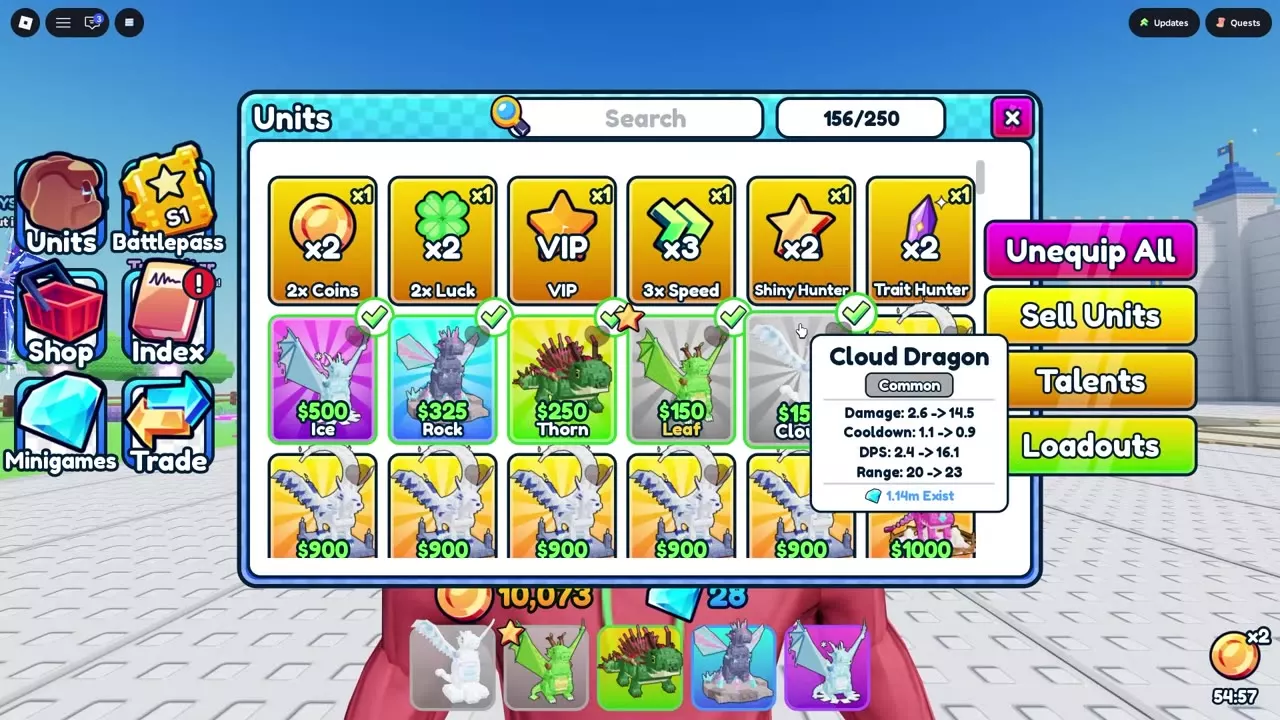
- Open Units to manage your equipped team.
- Select the copies you want to bring. Equipped copies have green check marks and appear in the bottom hotbar.
Your team has five equipped slots. You can enter your first match with just your starter; filling all five slots is unnecessary. Later, use Unequip All when you want to clear the team and choose a new lineup.

Enter Sunny Meadow and Place Your First Defender
Go to the Sunny Meadow — Easy entrance in the lobby. Stand in its waiting area and wait for teleportation. Matches support up to four players.
For the solo starter opening, begin with 600 Cash, 100 castle HP and a 16-unit deployment limit. The five equipped team slots determine which dragons you bring; the deployment counter tracks dragons placed on the battlefield.
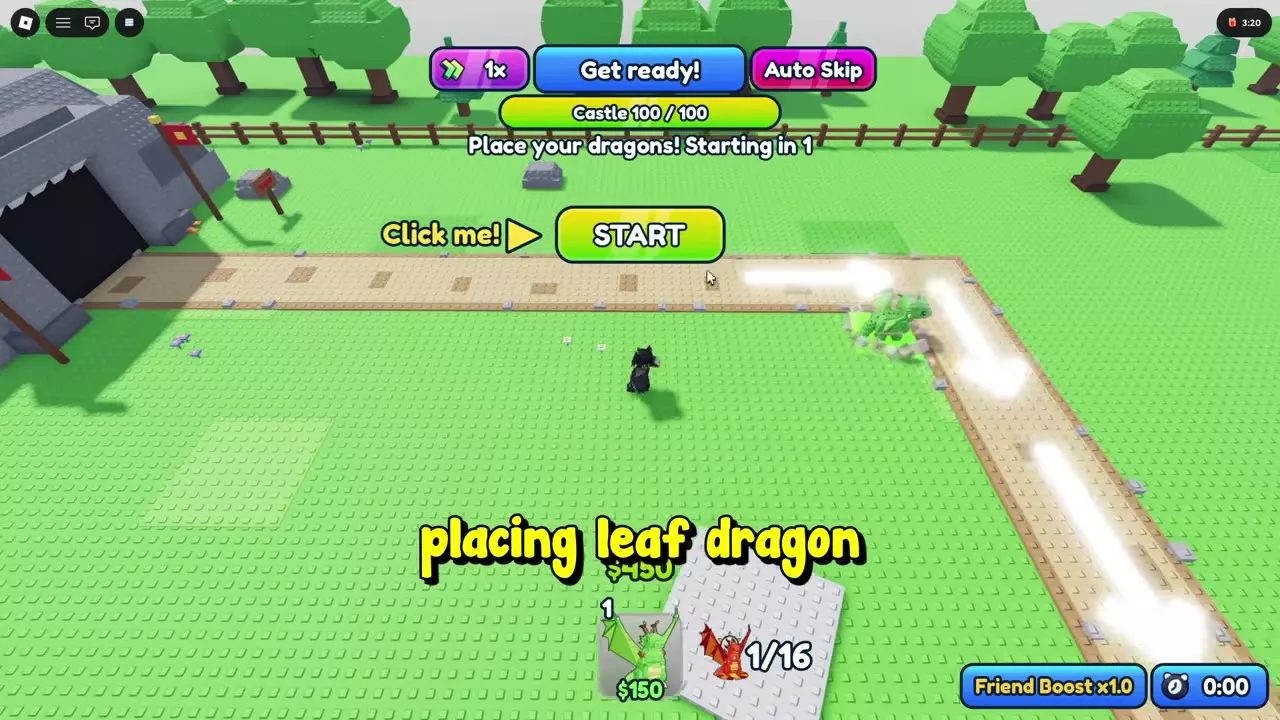
- During preparation, select your starter from the bottom hotbar.
- Move its placement preview beside the road, preferably near a bend where its attack range covers both approaching and turning enemies.
- Place the dragon for 150 Cash, leaving 450 Cash for early upgrades or another defender.
- Press START when ready, or let the preparation countdown finish.
Keep the road inside your defender's range. A position that looks close to the enemy entrance is useful only while the dragon can actually reach enemies traveling past it.
Cash pays for deployment and upgrades inside the match. Coins pay for progression outside combat, including summons.

Upgrade and Extend Your Coverage
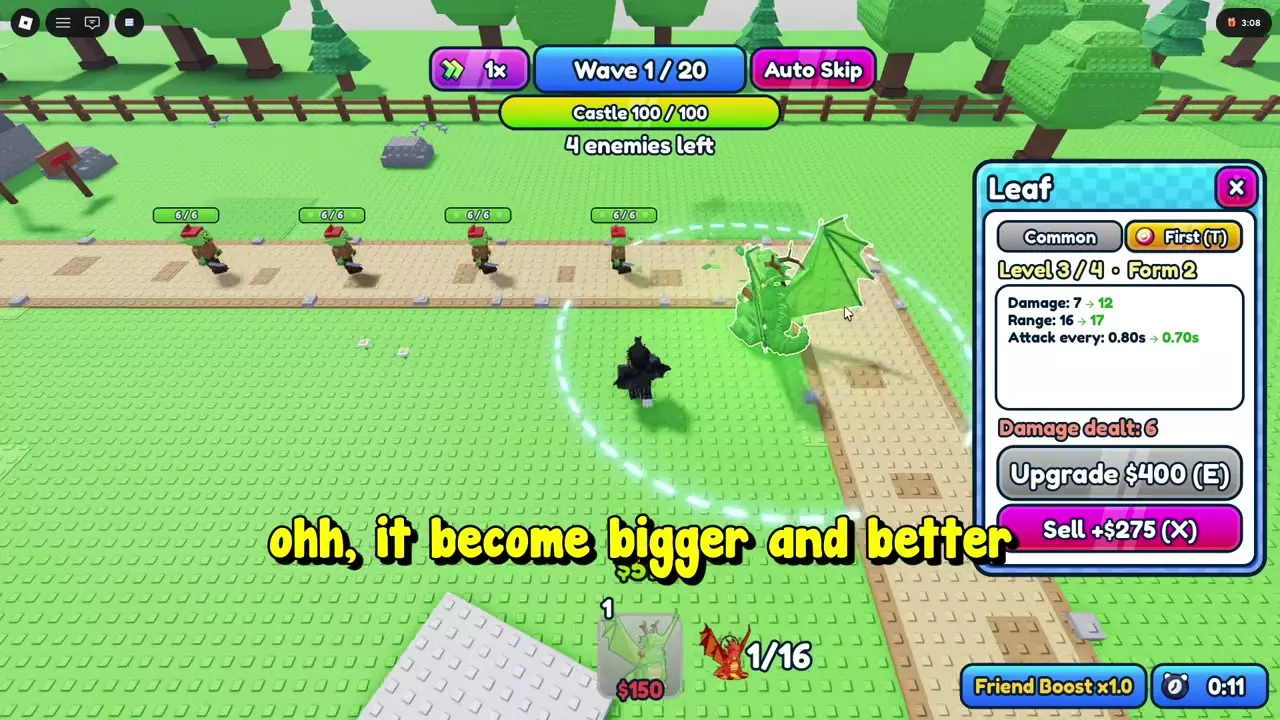
Strengthen your first attacker before spreading your Cash across many low-level defenders. Select a deployed dragon to see its current stats, next upgrade and price. Use Evolve, Upgrade or the E shortcut to buy the next improvement.
For a Leaf opening, follow this growth sequence:
| Action | Cost | Result |
|---|---|---|
| Place Leaf | 150 Cash | Level 1 · Form 1 |
| Evolve | 150 Cash | Level 2 · Form 2 |
| Upgrade | 250 Cash | Level 3 · Form 2 |
| Upgrade | 400 Cash | Level 4 · Form 2 |
The first two improvements cost 400 Cash after placement, so they fit within your 600-Cash starting budget. Earn more battle Cash before buying the final 400-Cash upgrade. At Level 4, Leaf reaches MAX LEVEL; further spending should go toward another defender or its upgrades.
Once the first attacker is established, add dragons around bends and farther along the road toward the castle. Overlap their firing areas so enemies continue taking damage after leaving the opening position.
Watch where surviving enemies stop taking damage. Put your next defender ahead of them along the route. Adding another dragon beside the same front line will not solve a gap farther down the road.
Continue until the wave total shown in your match is complete. In a 20-wave Easy match, wave 10 is an intermediate encounter; victory comes after wave 20. Use the Sunny Meadow Easy walkthrough for the full Leaf route or the separate Cloud, Thorn and Mushroom route.
Claim Rewards and Summon Your Next Team
Easy has both 10-wave and 20-wave configurations. Their base victory rewards differ:
| Easy configuration | Final boss | Base reward |
|---|---|---|
| 10 waves | Goblin Brute | 100 Coins |
| 20 waves | Goblin King | 150 Coins |
Bonuses are added separately. A 20-wave victory with a 100-Coin Welcome Bonus pays 250 Coins total; the base win reward remains 150 Coins.
- Choose Lobby on the results screen to return to your collection and summoning menus.
- Walk onto the glowing Summon Units platform and open Summon.
- Inspect the current dragons and their listed chances, then choose a summon you can afford.
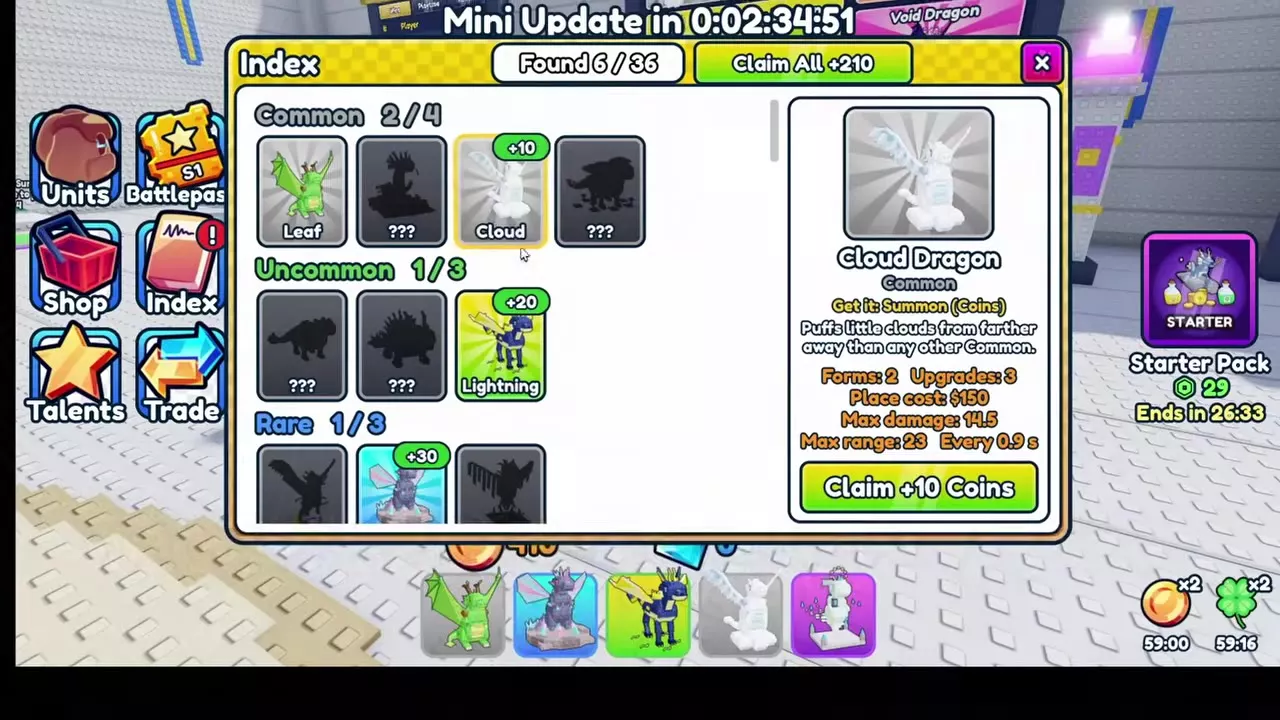
- Open Index after discovering new dragons. Select an entry to claim its Coins, or press Claim All to collect all available discovery rewards. Collected rewards change to Claimed.
- Return to Units, equip the dragons you want to use and check the green marks and hotbar before your next match.
A single summon costs 100 Coins. Ten summons cost 900 Coins, saving 100 Coins compared with ten paid singles. Use a single when you want another dragon immediately and have a smaller budget; save for ten when you can wait for the discount. A 150-Coin base victory reward covers one paid single summon.
Leave enough inventory space for the batch: a ten-summon needs ten free spaces. An available option marked FREE lets you use a free summon.
See summoning costs and options for the full system, or Units and Index controls for collection management.

Opening Problems and Next Goals
- Not enough cash: The attempted deployment or upgrade does not complete. Compare your battle Cash with the displayed price and wait until you can afford it. Keep your next upgrade in mind before placing extra dragons.
- Crowded placement: Leave space between defenders and move the placement preview farther from nearby units when a spot will not accept it. Keep the road within range as you reposition.
- Enemies passing the front line: Add a firing position farther along the route, especially near a bend or the castle approach. Upgrade it so it can finish enemies that survive the opening defense.
- Too much happening at once: Stay at 1x speed while learning placement and upgrades. Turn off Auto Skip if new waves are arriving before you can manage the defense. Match speed accelerates combat; Auto Skip advances waves automatically.
After your first win, replay Easy until you can consistently afford upgrades and cover the route. You can use Play Again for another run or return to the lobby to change your team.
To check your wins, go to the LEADERBOARDS board in the lobby and select Wins. Your row at the bottom shows your rank and total wins. The other tabs are Playtime and Robux.
Your next progression goals are Castle Town on Normal, a Hard clear to unlock Talents, and an Insane clear to unlock Endless Mode. Improve your team between attempts instead of advancing with the same opening problems unresolved.
Map Walkthroughs and Combat Controls
- Sunny Meadow Easy walkthrough: Follow the complete 20-wave Leaf route or 10-wave mixed-team route.
- Combat controls: Learn targeting, upgrades, wave settings, selling and rebuilding.
- Dragon directory: Look up dragon attributes and acquisition methods.
- Team builds: Choose dragons that fill useful roles across your five equipped slots.